
Educational technology has become an important part of modern education, giving teachers new ways to explain concepts, engage students, assess understanding, and support different learning needs. From interactive presentations and digital quizzes to virtual simulations and online collaboration platforms, technology can make everyday classroom activities more flexible and accessible.
However, successful technology integration involves more than introducing computers, tablets, or educational apps into lessons. Teachers need to select tools that support specific learning objectives, fit their students’ needs, and complement effective teaching practices.
Educational technology integration strategies help teachers use digital resources purposefully rather than treating technology as an additional task. When planned carefully, these strategies can encourage active participation, provide timely feedback, improve access to learning materials, and help students develop essential digital skills.
This guide explores practical ways to integrate educational technology into everyday teaching, with classroom examples, implementation tips, and recommendations for overcoming common challenges.
What Is Educational Technology Integration?
Educational technology integration is the purposeful use of digital tools, devices, platforms, and resources to support teaching and learning. It includes using technology to present information, facilitate discussions, assess student progress, encourage collaboration, and provide additional learning opportunities.
Examples of educational technology include:
- Interactive whiteboards and digital presentations.
- Learning management systems for sharing assignments and resources.
- Online quizzes and formative assessment platforms.
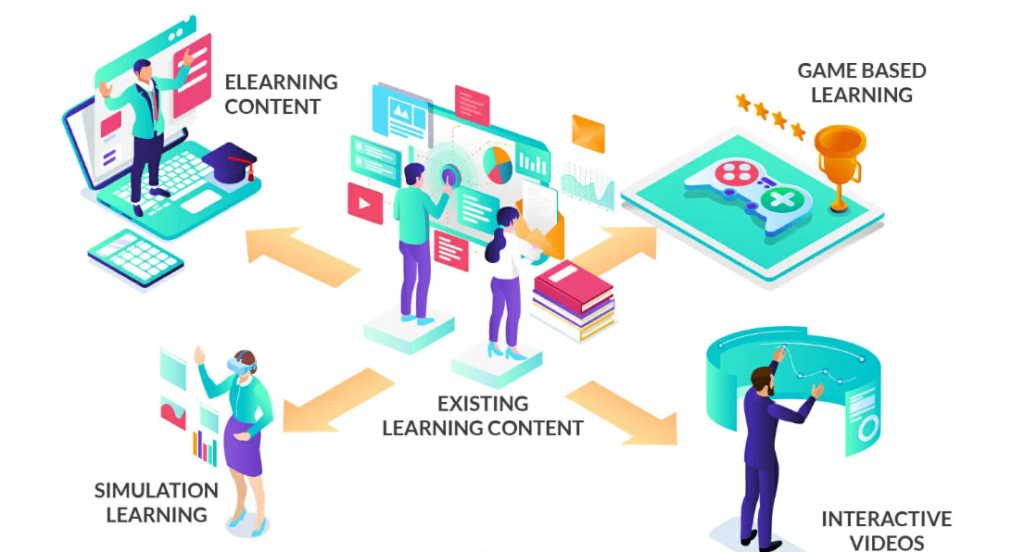
- Educational videos, animations, and simulations.
- Digital reading materials and audiobooks.
- Collaborative documents and virtual workspaces.
- Assistive technology for students with different learning needs.
- Digital portfolios for documenting student progress.
The most effective integration connects each tool to a clear educational purpose. For example, a science teacher might use a simulation to demonstrate a process that is difficult to observe in a traditional classroom. A language teacher might use audio recordings to help students practise pronunciation and evaluate their speaking skills.
In both cases, technology supports an activity that helps students understand or practise the intended skill.
Why Is Educational Technology Important in Everyday Teaching?
When selected thoughtfully, educational technology can support several important aspects of classroom learning. Its value depends on how well it fits the subject, the learning objective, and the students using it.
1. It Makes Complex Concepts Easier to Understand
Some topics are difficult to explain through spoken instruction or static diagrams alone. Visualizations, animations, and interactive models can help students explore relationships and processes.
For example, a biology teacher can use an animation to demonstrate how blood circulates through the body. A mathematics teacher can use dynamic geometry software to show how changing the dimensions of a shape affects its area.
These tools provide additional ways to represent information, helping students connect abstract ideas with visual examples.
2. It Encourages Student Participation
Digital polls, interactive questions, and collaborative activities can give students more opportunities to participate during lessons.
Students who hesitate to answer questions aloud may feel more comfortable submitting responses through a digital platform. Teachers can then review the responses and identify areas that need clarification.
Technology does not automatically make students engaged, but a well-designed activity can encourage participation and meaningful thinking.
3. It Supports Different Learning Needs
Students have different strengths, prior knowledge, language skills, and accessibility requirements. Digital resources can provide alternative ways to access information and demonstrate understanding.
Examples include captions on instructional videos, screen readers, adjustable text sizes, audio instructions, and opportunities to revisit recorded explanations.
These options can make learning materials more accessible while helping teachers provide appropriate support.
4. It Improves Feedback and Assessment
Digital assessment tools can help teachers collect responses quickly and identify patterns in student understanding.
A short online quiz, for example, may reveal that many students misunderstand a particular concept. The teacher can address the misconception before introducing more advanced material.
Technology can make feedback more immediate, but teachers still need to interpret results carefully and provide explanations that help students improve.
5. It Develops Digital Literacy
Students increasingly need to search for information, evaluate online sources, communicate responsibly, protect personal information, and create digital content.
Integrating these skills into regular lessons allows students to practise digital literacy in meaningful contexts instead of learning about technology only as a separate subject.
1. Start With Clear Learning Objectives
One of the most important educational technology integration strategies is to establish the learning objective before selecting a tool.
Teachers should first decide what students need to know, understand, or demonstrate by the end of a lesson. They can then determine whether technology offers a useful way to achieve that outcome.
Consider a lesson on fractions. If the objective is for students to compare fractions with different denominators, a digital fraction model may help them visualize equivalent values. If students already understand the concept and need additional practice, a short quiz may be more appropriate.
Before introducing a digital tool, ask:
- What specific learning outcome should this activity support?
- Will technology make the concept clearer or the activity more effective?
- What will students actively do with the tool?
- How will I determine whether learning has taken place?
- Is there a simpler approach that would achieve the same result?
These questions prevent technology from becoming a distraction and keep the focus on student learning.
2. Use Interactive Presentations Instead of Passive Slides
Digital presentations can help teachers organize information, display visual examples, and explain difficult concepts. However, students may lose interest when presentations involve long sequences of text and little interaction.
Teachers can make presentations more effective by incorporating short activities throughout the lesson.
Practical ideas include:
- Add a question after each major concept.
- Use diagrams to explain relationships between ideas.
- Include a short prediction task before revealing an answer.
- Ask students to discuss a visual example with a partner.
- Display a problem and let students propose solutions.
- Use a quick poll to check understanding before moving forward.
For example, a history teacher discussing ancient civilizations might display a map, an artifact, and a timeline. Students can examine the evidence and explain what it suggests about trade, settlement, or daily life.
The presentation becomes a starting point for discussion and analysis rather than simply a way to deliver information.
3. Integrate Educational Videos and Simulations
Videos, animations, and simulations can help students observe processes, explore unfamiliar environments, and revisit challenging explanations.
These resources are especially useful when direct observation is difficult, expensive, unsafe, or impractical.
Classroom examples
Science: Use an animation to show the stages of cell division or a simulation to investigate forces and motion.
Geography: Explore maps and satellite imagery to examine landforms, climate patterns, or urban development.
Mathematics: Use an interactive model to investigate geometric transformations or the relationship between fractions and decimals.
Language arts: Analyze a short video to discuss storytelling, persuasive techniques, tone, or visual communication.
History: Examine historical images, recorded interviews, and documentary excerpts to compare perspectives and evaluate evidence.
To use these resources effectively, teachers should give students a specific purpose before they begin watching or exploring.
For example, ask students to identify three changes they observe during a simulation or explain why a particular result occurs. Afterward, discuss the findings and connect them to the lesson objective.
Avoid using videos simply to fill classroom time. A short, focused resource with a meaningful follow-up activity is often more useful than a long video without discussion.
4. Use Digital Quizzes for Formative Assessment
Digital quizzes can provide a convenient way to check student understanding during everyday instruction. They allow teachers to gather responses, identify common mistakes, and decide what to teach next.
A quiz might include multiple-choice questions, matching activities, short responses, or questions that require students to explain their reasoning.
For example, after teaching the difference between a fact and an opinion, an English teacher could present several statements and ask students to classify them. The response patterns can reveal whether students understand the distinction or need further examples.
Effective digital assessment strategies include:
- Use short quizzes at meaningful points in a lesson.
- Include questions that test understanding rather than memorization alone.
- Review incorrect responses to identify misconceptions.
- Discuss why an answer is correct or incorrect.
- Give students another opportunity to practise the skill.
- Use results to adapt upcoming instruction.
Teachers should not rely exclusively on automatically scored questions. Written explanations, discussions, and practical tasks can provide a deeper understanding of student thinking.
Digital assessment should support instructional decisions, not simply generate scores.
5. Encourage Collaboration Through Digital Tools
Collaborative digital tools allow students to share ideas, contribute to group projects, and review one another’s work. These activities can develop communication, problem-solving, and teamwork skills.
Teachers can use shared documents, virtual whiteboards, discussion boards, and presentation platforms to organize collaborative learning.
For example, students working on an environmental science project could create a shared document containing research findings, organize their evidence into categories, and prepare a joint presentation.
To make collaboration productive, teachers should establish clear expectations.
Each student should understand their responsibilities, the project’s purpose, and how contributions will be evaluated. Assigning roles such as researcher, writer, fact-checker, and presenter can help distribute work fairly.
Teachers should also monitor participation. A shared document does not guarantee that every student contributes equally, so individual reflections or short explanations can help demonstrate what each learner has understood.
6. Personalize Learning With Digital Resources
Students do not always need identical activities or the same amount of practice. Some may require additional explanations, while others are ready for more challenging tasks.
Digital learning resources can help teachers offer flexible practice opportunities without completely redesigning every lesson.
Examples include:
- Additional practice questions for students who need reinforcement.
- Extension activities for students who have mastered the main objective.
- Recorded explanations that students can review independently.
- Digital reading materials at appropriate levels of complexity.
- Interactive vocabulary activities for language development.
- Self-paced exercises that allow students to work through concepts at a manageable speed.
For example, after a mathematics lesson, students could complete different practice sets based on their current understanding. The teacher might provide visual models to one group, standard practice to another, and advanced application problems to students who are ready.
These groups should remain flexible as students develop their skills.
Personalized learning does not mean leaving students to learn independently without guidance. Teachers still need to explain concepts, monitor progress, provide feedback, and ensure that activities align with curriculum goals.
7. Make Homework and Independent Practice More Effective
Educational technology can extend learning beyond classroom hours by making instructions, resources, and assignments easier to access.
A learning management system can help teachers organize homework, share lesson materials, provide announcements, and collect completed work.
Teachers can improve digital homework by following a few principles.
Keep Instructions Clear
Students should understand the task, expected outcome, deadline, and submission method. Short examples or checklists can reduce confusion.
Connect Assignments to Classroom Learning
Digital homework should reinforce or extend the concepts taught in class rather than introduce unfamiliar material without sufficient guidance.
Provide Useful Feedback
Comments, worked examples, and targeted revision tasks can help students learn from mistakes instead of simply seeing a grade.
Avoid Excessive Screen Time
Not every assignment needs to be completed online. Reading a printed text, conducting an observation, practising handwriting, or solving problems on paper may be more appropriate for certain objectives.
Teachers should also consider whether students have reliable internet access and suitable devices at home. When access is limited, downloadable materials, printed alternatives, or time to complete work at school can help maintain fairness.
8. Integrate Technology Into Reading and Writing Instruction
Digital resources can support reading comprehension, vocabulary development, writing practice, and revision.
For reading activities, teachers may use digital texts with dictionaries, annotations, adjustable text sizes, or audio support. Students can highlight evidence, record questions, and identify important ideas while reading.
For writing instruction, collaborative documents and word-processing tools allow students to draft, revise, edit, and receive feedback.
Useful classroom activities include:
- Ask students to annotate a passage and identify its main idea.
- Use digital vocabulary cards to practise new terms.
- Have students compare two texts and record similarities and differences.
- Guide students through the stages of planning, drafting, revising, and editing.
- Use comments to provide specific feedback on organization or evidence.
- Ask students to maintain a digital portfolio of selected writing samples.
Teachers should still teach essential reading and writing skills explicitly. Digital tools can support these processes, but they do not replace careful instruction in comprehension, grammar, vocabulary, and written communication.
9. Use Educational Technology to Support Students With Different Needs
Accessible technology can help reduce barriers that prevent some students from participating fully in classroom activities.
Depending on the student’s needs and the available resources, useful features may include:
- Captions and transcripts for audio or video content.
- Text-to-speech tools that read digital text aloud.
- Speech-to-text tools for composing written responses.
- Screen magnification and adjustable text display.
- Keyboard navigation and compatible assistive devices.
- Visual schedules and clearly structured digital instructions.
- Audio recordings that allow students to review explanations.
For example, a student who finds lengthy written instructions difficult to process may benefit from a concise visual checklist paired with spoken directions. Another student may use speech-to-text to communicate ideas while developing typing skills.
Teachers should select accommodations based on individual needs, accessibility requirements, and school guidance. They should also confirm that the chosen tools work with the learning platform and are usable by the student.
Accessibility is most effective when considered during lesson planning rather than added only after a student encounters difficulty.
10. Teach Digital Citizenship and Online Safety
Technology integration should include instruction on responsible and safe digital behavior. Students need to understand not only how to use digital tools but also how to make appropriate decisions when working online.
Important digital citizenship topics include:
Privacy: Teach students to protect personal information and avoid sharing sensitive details in public spaces.
Cyberbullying: Explain how to recognize harmful online behavior, report concerns, and communicate respectfully.
Copyright: Help students understand that online images, articles, and videos may have usage restrictions. Teach appropriate attribution and responsible reuse.
Information literacy: Show students how to evaluate an author’s expertise, check publication dates, compare sources, and distinguish evidence from unsupported claims.
Digital communication: Establish expectations for respectful language, constructive feedback, and appropriate online discussion.
Artificial intelligence: Explain that AI-generated information can contain errors or misleading claims. Students should verify important information, follow school policies, and be transparent about permitted AI assistance.
Teachers can integrate these topics into ordinary subject lessons. For example, a research assignment can include evaluating source credibility and documenting where information came from.
Digital citizenship should be practised consistently rather than addressed only when a problem occurs.
11. Choose Educational Technology Tools Carefully
There are many educational apps and platforms available, but teachers do not need to use every new product. A small selection of reliable tools that serve clear purposes may be easier to manage and more effective for students.
Before adopting a tool, consider the following factors:
| Selection factor | Questions to consider |
|---|---|
| Learning value | Does the tool support a specific curriculum objective? |
| Ease of use | Can teachers and students use it without excessive training? |
| Accessibility | Does it support students with different needs? |
| Compatibility | Does it work with available devices and school systems? |
| Privacy | How are student information and activity data collected and protected? |
| Cost | Are there subscription fees, device requirements, or hidden costs? |
| Reliability | Does the tool work consistently with the school’s internet connection? |
| Assessment | Does it provide useful evidence of student understanding? |
Teachers should also review school policies and obtain appropriate permissions before students create accounts or use external services.
When possible, test a tool with a small activity before introducing it across an entire class or course.
12. Address Common Challenges in Technology Integration
Even well-planned educational technology integration can face practical obstacles. Teachers can improve implementation by anticipating these challenges and preparing realistic solutions.
Limited Devices or Internet Access
Not every school has enough devices for individual student use, and internet connections may be unreliable.
Solution: Use rotating stations, paired activities, shared devices, downloadable resources, or offline alternatives. Plan a non-digital backup for essential lesson activities.
Limited Teacher Confidence
Some teachers may feel uncertain about using unfamiliar platforms or troubleshooting technical problems.
Solution: Begin with one tool that solves a specific classroom need. Practise the activity beforehand, use available training, and exchange ideas with colleagues.
Student Distraction
Devices may encourage students to switch between learning tasks and unrelated content.
Solution: Establish clear device expectations, provide structured tasks, limit unnecessary notifications where possible, and monitor progress during activities.
Too Many Platforms
Using different applications for every task can create confusion for students and increase teachers’ workload.
Solution: Choose a manageable set of approved tools and use them consistently. Clear routines can reduce time spent navigating different systems.
Technical Problems During Lessons
Unexpected connectivity issues or software errors can interrupt classroom activities.
Solution: Test equipment before the lesson, prepare screenshots or downloaded materials, and keep an alternative activity available.
Difficulty Measuring Impact
A lesson may appear more engaging because it includes technology, but engagement alone does not prove that students have learned more.
Solution: Compare student responses, work samples, assessment results, and the quality of their explanations with the intended learning objectives. Retain tools that add educational value and reconsider those that do not.
13. Evaluate Whether Technology Is Improving Learning
Teachers should periodically review the effectiveness of their educational technology integration strategies. The purpose is to determine whether digital tools are helping students achieve the intended outcomes and whether the benefits justify the time and resources required.
Useful indicators include:
- Student accuracy on relevant assessment tasks.
- Quality of explanations and completed assignments.
- Participation in discussions and collaborative work.
- Improvement in a skill over several lessons.
- Student ability to apply knowledge to new situations.
- Accessibility and participation across different learner groups.
- Time required for teachers to prepare activities and provide feedback.
For example, a teacher who introduces interactive mathematics simulations might compare students’ explanations of geometric concepts before and after using them. If students develop a clearer understanding, the activity may be worth continuing. If results remain unchanged, the teacher can revise the task or choose another method.
Evaluation should consider more than test scores. Student work, classroom observations, accessibility, and the quality of learning experiences can all inform decisions.
Teachers should also remain open to combining digital and traditional approaches. The best choice is the one that supports the learning objective in the specific classroom context.
A Simple Plan for Integrating Technology Into Everyday Lessons
Teachers who are new to educational technology can begin with a small, manageable plan.
Step 1: Select one learning objective. Identify the knowledge or skill students should demonstrate.
Step 2: Choose one suitable tool. Select a digital resource that directly supports the objective.
Step 3: Design the student activity. Decide what learners will do, create, explain, or practise using the tool.
Step 4: Prepare instructions and alternatives. Make sure students understand the task and have a way to participate if technology fails or access is limited.
Step 5: Teach the activity. Model how to use the tool, establish expectations, and provide guidance.
Step 6: Assess learning. Review student responses, work samples, or demonstrations to determine whether the objective was achieved.
Step 7: Reflect and improve. Consider what worked, what caused difficulty, and whether the tool should be adapted or used again.
For example, a teacher might begin by using a short digital exit ticket at the end of one lesson each week. After becoming comfortable with the routine, the teacher could introduce collaborative documents or subject-specific simulations when they offer additional value.
Gradual implementation helps teachers build confidence while keeping classroom learning at the center of each decision.
Frequently Asked Questions
What are educational technology integration strategies?
Educational technology integration strategies are practical approaches for using digital tools to support teaching and learning. They include interactive presentations, digital formative assessments, collaborative projects, educational simulations, accessible learning resources, and online feedback.
How can teachers integrate technology into everyday lessons?
Teachers can begin by identifying a learning objective and selecting a digital tool that supports it. They might use an interactive presentation to explain a concept, a short quiz to check understanding, or a shared document for group work. Student learning should remain the priority.
What are the benefits of educational technology in the classroom?
Educational technology can provide alternative ways to represent information, increase opportunities for participation, support accessibility, facilitate feedback, and develop digital literacy. The benefits depend on how effectively the technology is matched to the lesson and students’ needs.
Does educational technology improve student achievement?
Educational technology can support learning when it is used appropriately, but its impact varies according to the tool, subject, activity, and classroom context. Simply introducing devices does not guarantee better outcomes. Teachers should evaluate whether technology helps students understand and apply the intended concepts.
What technology tools should teachers use first?
Teachers can start with an approved presentation tool, a learning management system, a simple formative assessment platform, or a collaborative document tool. The best starting point depends on the learning objective, available devices, school policies, and teacher experience.
How can teachers use technology when students have limited internet access?
Teachers can use downloadable resources, offline applications, printed alternatives, shared devices, or classroom-based activities that require only occasional internet access. Schools should consider students’ access to devices and connectivity when assigning digital homework.
How can technology support differentiated instruction?
Digital tools can provide adjustable text, audio support, additional practice, interactive examples, and extension activities. Teachers can use these options to address different learning needs while maintaining meaningful learning objectives for all students.
How can teachers prevent technology from distracting students?
Teachers can set clear expectations, choose tools with a defined educational purpose, provide structured tasks, and monitor student participation. Limiting unnecessary applications and notifications can also help students stay focused.
Conclusion
Integrating educational technology into everyday teaching does not require teachers to transform every lesson into a digital experience. It requires thoughtful decisions about when technology can make learning clearer, more accessible, more interactive, or easier to assess.
The most effective educational technology integration strategies begin with clear learning objectives, use appropriate digital tools, and include opportunities for students to practise, receive feedback, and demonstrate understanding.
Teachers should also consider accessibility, student privacy, digital citizenship, device availability, and the practical demands of classroom instruction. By evaluating results and adapting their approach, educators can identify which tools provide genuine value.
Ultimately, technology is most useful when it strengthens the relationship between teaching and learning. With careful planning and consistent reflection, teachers can build flexible classroom routines that help students develop subject knowledge, digital skills, independence, and confidence.